Recipe saver
Save every recipe your family cooks, wherever you found it
By the end of this page you'll know how to get the recipes you care about — a website link, a cookbook page, Mom's handwritten card, a recipe someone texted you, or the dish someone only knows by heart — into one recipe book your whole family can open. You'll also see how that book turns into next week's dinners and a shopping list, and the one habit that makes any saved recipe better, with or without an app.
How a recipe gets into FamPlate
-
Open New recipe
Choose Quick import — dictate, paste a link, take a photo or paste text — or Manual entry to type it yourself. On iPhone, iPad and Android you can also share a link, text or an image to FamPlate straight from another app.
-
Let the AI do the typing
FamPlate reads what you gave it and fills in the title, the ingredients with quantities, and the steps. A recipe imported from a website keeps a link back to the site it came from.
-
Check it and save
It's an ordinary recipe, so you can fix or change anything. It lands in your family's book, where everyone in your kitchen sees it.
-
Plan it, shop for it, cook it
Add it to a day in the week, send its ingredients to the shopping list, or open it in step-by-step cook mode with timers.
Every way a recipe can get in
Recipes don't arrive in one format, so FamPlate doesn't ask for one. The New recipe screen has a Quick import tab with four AI options and a Manual entry tab for typing it yourself.
Voice works in the iPhone and Android apps; in a web browser it needs Chrome or an Android browser. The share-menu shortcut is in the phone and tablet apps only.
- A recipe website link: FamPlate fetches the page, uses the site's structured recipe data (schema.org) when it has it, and otherwise reads the page text.
- A social post from Instagram, TikTok, Facebook, YouTube, Threads or Pinterest — the recipe can be in the caption, the video, a linked page or the images.
- A photo: a cookbook page, a printed or handwritten recipe card, or a screenshot.
- Your voice: say the recipe the way you'd tell it, and it comes back as ingredients and steps.
- Paste: copy text from an email, a message or a note; a pasted link goes to the link importer.
- Manual entry: name, dish type, meal time, servings, difficulty, cuisine, diet, ingredients with quantities and notes, and steps with optional timers.
- Share menu: on iPhone, iPad and Android, FamPlate appears in the system Share list for a link, text or an image.
When a link won't import
No importer can read every website, and FamPlate doesn't pretend to. Pages that only show the recipe after running scripts, pages behind a login, a paywall or a bot check, and pages with almost no text come back with nothing to save. FamPlate tells you, and an attempt that finds no recipe doesn't use up your monthly allowance. On a very long page without structured recipe data, the recipe can sit beyond the part FamPlate reads.
A link to a cooking-video page with no written recipe may save as a titled bookmark with no ingredients, so you at least keep the link. For those, paste the text or photograph the recipe instead. Social posts have their own rules, and their own monthly allowance on the free plan.
One book for the whole family
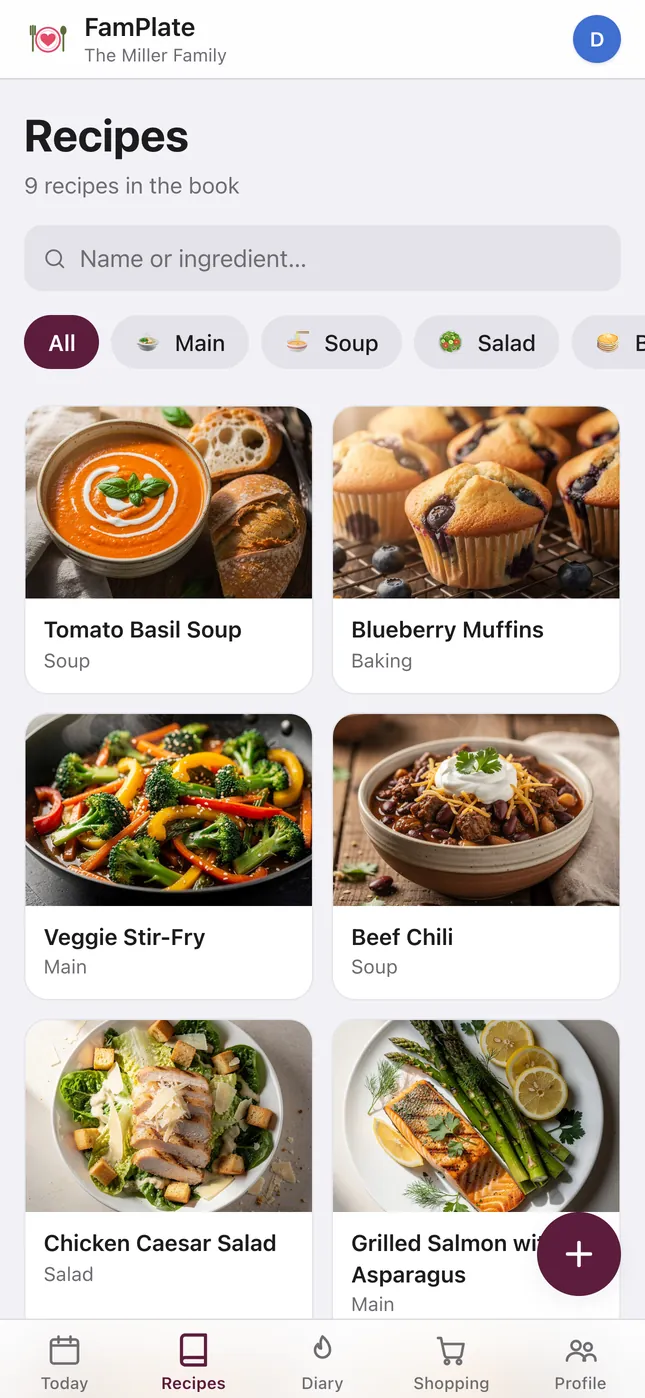
Recipes belong to the kitchen, not to one phone. Everyone in your family kitchen — up to four people — sees the same book, so the recipe your partner saved on Tuesday is there when you plan on Sunday. More on sharing in the family meal planner.
- Search by recipe name or by any ingredient: type quinoa and every recipe that uses quinoa shows up.
- Filter by dish type: Main, Side, Salad, Soup, Breakfast, Baking, Dessert, Snack and more.
- Each person hearts their own favorites and can rate a dish after dinner.
- Family notes, your own photos, “Serve with” pairings, duplicate, and archive with restore.
- Scale a recipe to the number of people you're cooking for.
- Nutrition per serving, per 100 g or for the whole dish, estimated by AI when you tap Calculate nutrition.
- A warning when a recipe contains something a family member avoids.
From saved recipe to dinner on the table
A saved recipe only matters if it gets cooked. From any recipe you can add it to a breakfast, lunch or dinner in your week, or send all its ingredients to the shopping list.
If you let the AI weekly menu planner fill your week, it mixes in up to three of your own saved recipes, favorites first. Then the shopping list gathers every ingredient into one list, with duplicates merged and what you already have at home left off.
What's free, and what FamPlate+ adds
FamPlate is free to use. The free plan includes 5 AI recipe captures a month — voice, photo, paste and website links share that allowance — plus a separate 5 social-post imports a month. Typing a recipe by hand never uses an allowance. Kitchens created on or after September 16, 2026 can keep up to 15 recipes in the book on the free plan.
FamPlate+ removes those limits for the whole family, from €4.99 a month (in the app stores you pay the store's local price), and adds a backup of the whole cookbook as a JSON file. There's no free trial — the free plan is how you try it.
The habit that makes any saved recipe better
Whatever you save recipes with, a recipe card only holds steps. What makes your family's version work is usually a sentence that isn't a step: “the batter should stay lumpy”, “Dad likes extra lemon”, “double the garlic”. Write that sentence down the first time you cook the dish, while you still remember it.
In FamPlate it goes into the recipe's family notes, where everyone sees it the next time the dish is on the plan.
Questions
Is FamPlate free?
Yes. The free plan covers saving, organizing, planning and the shopping list, with limits on the AI features: 5 recipe captures a month (voice, photo, paste, website link), 5 social imports a month, 1 AI week menu a week and 5 dish swaps a week. New free kitchens can keep up to 15 recipes. FamPlate+ removes the limits for the whole family, from €4.99 a month. There's no free trial.
Can FamPlate save a recipe from any website?
From many, but not every one. It reads the site's structured recipe data or the page text. Pages that need scripts to show the recipe, or sit behind a login, paywall or bot check, can't be read — paste the text or take a photo instead. A failed attempt that finds no recipe isn't counted.
Does it work on iPhone, Android and a computer?
Yes. There are apps for iPhone and iPad (iOS 15 or later) and Android (7.0 or later), and the website is the full app in any modern browser — you can even start as a guest without an email. There's no separate Mac or Windows app and no browser extension; on a computer, use the web app.
Can I import my recipes from Paprika, ReciMe or a file?
No. FamPlate doesn't import files or exports from other apps (Paprika, ReciMe, CSV and similar). You can bring recipes over one at a time by link, photo or pasted text; on the free plan those count toward the 5 captures a month.
Can it read a handwritten recipe card?
Yes — photograph the card and the AI turns it into ingredients and steps. Handwriting varies a lot, so check the quantities before you save.
What happens to my recipes and photos?
They're stored on servers in the EU. AI steps go to processors in the US under EU Standard Contractual Clauses, FamPlate doesn't keep AI inputs after the request, and our processors don't use them to train models. There are no ads and we don't sell your data. Details are on the privacy page.
Start your family's recipe book
Get FamPlate free on the App Store or Google Play, or open it in your browser and start as a guest — no email needed until you want to keep your kitchen. Save the first recipe you'd hate to lose.