AI weekly menu
An AI weekly meal planner that starts from your family's recipes
Read on and you'll know how to get a whole week of breakfasts, lunches and dinners planned in one go — with the dishes you already chose left exactly where you put them, a few of your family's own saved recipes mixed in, everyone's dietary restrictions respected, and a shopping list at the end. Plus the one rule that makes any weekly plan stick, with or without an app.
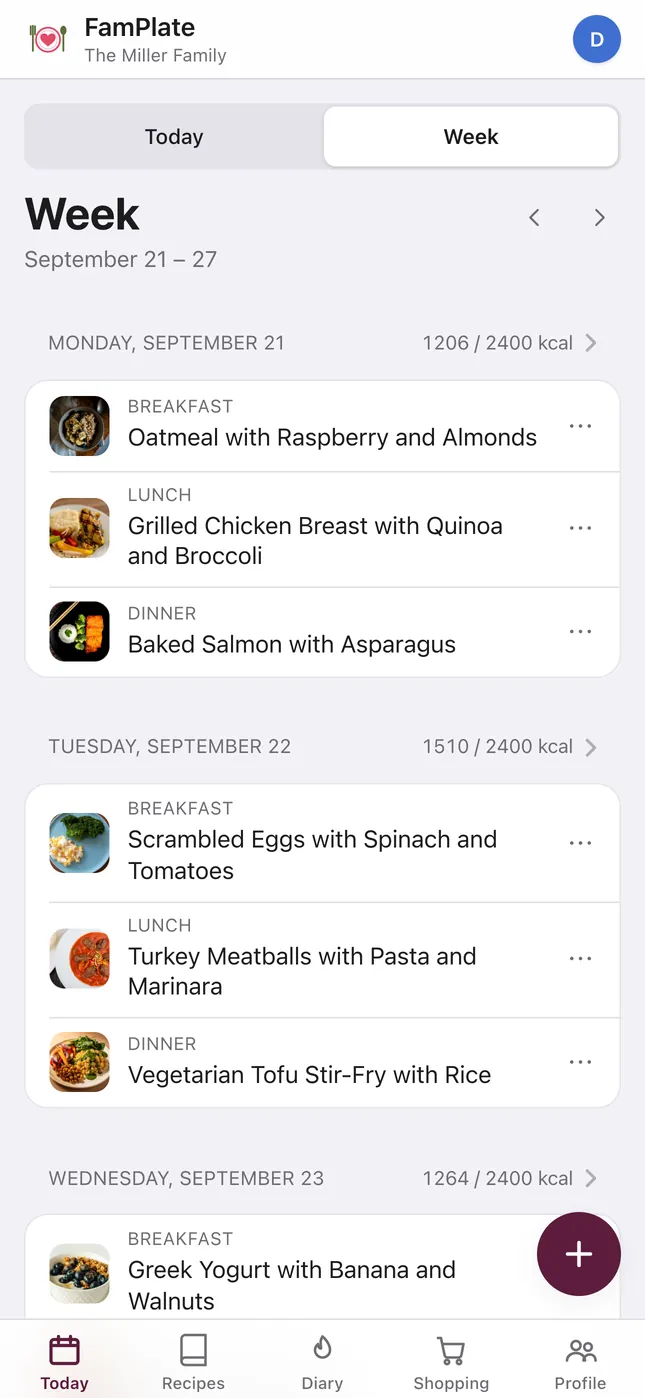
How the AI week works
-
Place the dishes you already know
Put anything you've decided on into its day — the birthday dinner, Friday's pizza night. These stay exactly where you put them.
-
Tap “Build the week with the chef”
Choose how many days to plan (1 to 14; a week by default) and whether it is for the whole family or one person. The AI fills only the empty slots.
-
Swap what doesn't fit
Not in the mood for Thursday's dinner? Swap that one dish for another suggestion without touching the rest of the week.
-
Build the shopping list
Turn the finished week into one list, with repeated ingredients merged and what you already have at home left off.
It fills the gaps and leaves your picks alone
The AI menu only touches empty slots. Every breakfast, lunch or dinner you planned by hand stays as you set it, so you can decide the two dinners that matter this week and let the AI handle the rest.
Every dish the AI adds is a full recipe you can open, and add to your family book if it's a keeper. Snacks aren't part of the plan — it covers breakfast, lunch and dinner.
Your own recipes come first
A week of strangers’ dishes is easy to ignore. So each AI week mixes in up to three recipes from your own book: favorites first, then dishes you have cooked, then the ones you saved most recently. A recipe never appears twice in the same week, and it is checked against the family’s dietary restrictions before it is placed.
One detail for bilingual families: the AI uses your own recipes whose titles are in the same language as the menu, and the menu follows the app language — English, Russian or Hebrew.
The more recipes you save, the more of the week sounds like home. See the recipe saver for every way to get them in.
Built around each person's restrictions
Each person in the kitchen can have dietary restrictions — vegetarian, vegan, gluten-free, lactose-free, nut-free, egg-free, low-carb, soy-free and more. The AI menu respects them, whether you plan for the whole family or for one person. Set them up in the family meal planner.
The week view shows each day's calories against the daily target, so you can see at a glance whether a day runs light or heavy. The numbers are AI estimates for everyday planning, not medical advice; for a serious allergy, always check the recipe and labels yourself.
Prefer to start from a ready-made week?
If you'd rather begin with a ready-made set of dinners, open the one-pan week or the rice week. One tap saves that week's dinners into your kitchen and plans them from the coming Monday — saving twice changes nothing. Then let the AI fill the empty slots around them.
What the free plan includes
On the free plan you get 1 AI week menu a week and 5 single-dish swaps a week, counted separately. Planning by hand and building the shopping list have no limit.
FamPlate+ makes AI menus and swaps unlimited for the whole family, from €4.99 a month (in the app stores you pay the store's local price). There's no free trial.
The rule that makes any weekly plan stick
The expensive part of dinner is the deciding, not the cooking. Decide once for the whole week — same day, same time, every week — and you stop paying that cost every evening at six.
Leave one slot open for leftovers or a cook-what's-in-the-fridge night. A plan with no slack is the easiest kind to abandon. This works on paper tonight. In FamPlate, remove the AI's dish from that night after the week is built — the shopping list only includes what's planned.
Questions
Does the AI replace the meals I already planned?
No. It fills only the empty breakfast, lunch and dinner slots and keeps everything you placed by hand.
Can it use recipes I saved myself?
Yes. Each AI week mixes in up to three of your own recipes — favorites first, then ones you have cooked, then recently saved — as long as their titles are in the menu language and they fit the family’s dietary restrictions.
Can it plan for a vegetarian or gluten-free family member?
Yes. Dietary restrictions are set per person, and the AI menu respects them for the whole family or for one person. It's a planning aid, not medical advice.
How many AI menus do I get for free?
One AI week menu a week, plus 5 single-dish swaps a week. FamPlate+ makes both unlimited for the whole family, from €4.99 a month. There is no free trial.
Can it plan snacks or more than a week?
It plans breakfast, lunch and dinner — snacks go in the nutrition diary instead. You can plan anywhere from 1 to 14 days at a time.
Which languages does the AI menu speak?
English, Russian and Hebrew. The menu follows the language you use the app in.
Is my family's data used to train AI?
Our AI processors don't use your inputs to train models, and FamPlate doesn't keep AI inputs after the request. Your data is stored on servers in the EU; AI requests go to processors in the US under EU Standard Contractual Clauses. Details on the privacy page.
Plan next week in one go
Get FamPlate free on the App Store or Google Play, or open it in your browser and start as a guest. Place the two dinners you already know, then let the chef fill the rest.