Family meal planning
One meal plan the whole family can see, share and cook from
By the end of this page you'll know how to move the family's meal plan out of one person's head and into one shared kitchen: up to four people, one recipe book, a week of breakfasts, lunches and dinners, and one shopping list — with each person's dietary restrictions taken into account. You'll also get the one question worth asking before you plan, so dinner isn't decided at the table.
Set up your family kitchen
-
Create the kitchen
Sign up with email, Google or Apple. Or start as a guest in the browser and add an email later — everything you added stays.
-
Invite your family with a code
Share the kitchen's invite code. Family members join with just a name — no email, no password. Codes expire, and the owner can make a new one at any time. (A guest kitchen needs an account before it can invite anyone.)
-
Add each person's needs
Each person can set dietary restrictions such as vegetarian, vegan, gluten-free, lactose-free or nut-free, foods they avoid, and a daily calorie target worked out from their details or typed in by hand.
-
Plan the week together
Pick dishes from the shared book for any breakfast, lunch or dinner, or let the AI fill the empty slots. Then build one shopping list from the whole plan.
One kitchen, up to four people
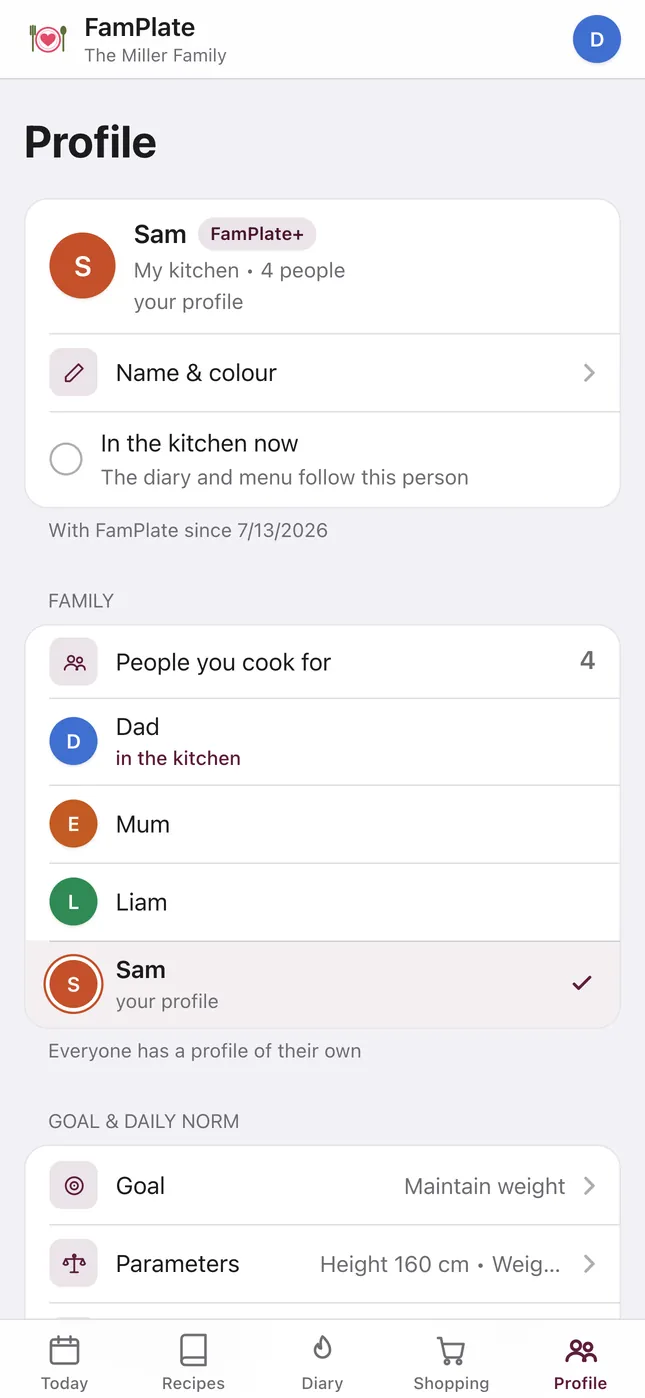
A FamPlate kitchen holds up to four people on every plan; FamPlate+ doesn't change that number. Everyone shares the same recipe book, week plan, shopping list and pantry, and each person keeps their own profile and their own nutrition diary.
A child can be part of the family with just a name. The account itself belongs to an adult. One FamPlate+ subscription covers the whole family.
Who can change what
Day to day, every member works in the shared book, week plan, shopping list and pantry, and keeps their own diary and profile.
A few things are kept for the owner — the person who created the kitchen:
- Renaming the family.
- Making a new invite code.
- Editing or removing another person's profile.
- Changing who a profile belongs to.
Different people, different plates
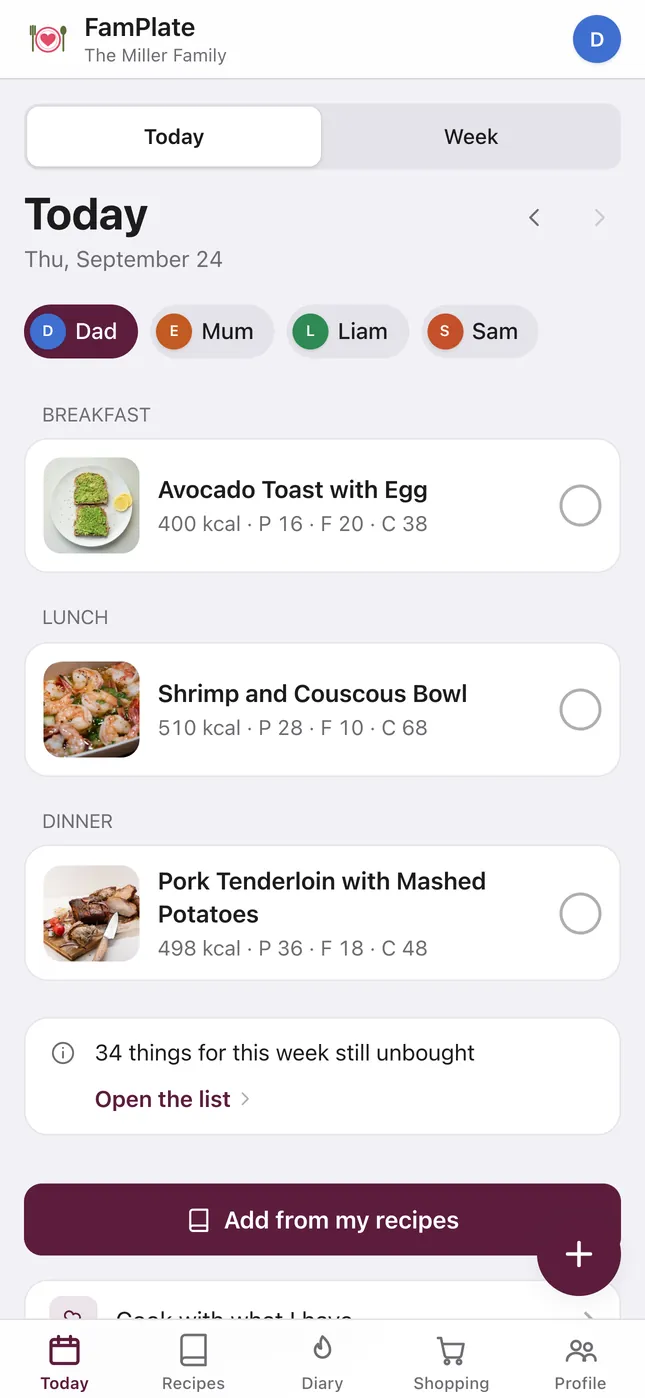
Families rarely eat identically, so FamPlate keeps needs per person, not per family. The Today view has a chip for each person, so you can see the day's meals and numbers for whoever you're cooking for.
Calories and nutrition in FamPlate are AI estimates for everyday planning, not medical advice. For a serious allergy, always check the recipe and the labels yourself.
- Dietary restrictions per person. The AI menu respects them, and a recipe shows a warning when it contains something a family member avoids.
- A daily calorie and macro target per person, calculated automatically (Mifflin-St Jeor) or set by hand. The week view shows each day against the target.
- Favorites per person: each family member hearts their own recipes.
- A personal nutrition diary: log what you ate by voice, by a photo of the meal or of a food label, or by scanning a barcode.
Plan by hand, or let the AI fill the gaps
Each day has three slots — breakfast, lunch and dinner — shown day by day or as a whole week. Add any recipe from the family book to any slot. Snacks are not plan slots; they go in the diary.
When you'd rather not decide everything, “Build the week with the chef” fills only the empty slots, for the whole family or for one person, keeps everything you picked, and mixes in up to three of your own saved recipes. Read more about the AI weekly menu planner, or start from a ready-made one-pan week.
One list for everyone who shops
When the week is planned, one tap builds the shopping list: repeated ingredients merged into one line, anything already in your pantry left off, and everything grouped into aisle sections. Everyone in the kitchen sees the same list, and you can send it to WhatsApp, Telegram or any other app from your phone’s share menu.
It isn't a live, real-time list: a change someone else makes shows up when you reopen or refresh it. More on turning recipes into a shopping list.
The question to ask before you plan, not at the table
Whatever you plan with, ask each person — the youngest first — for one dinner they'd like this week, before you plan it. A dish someone chose is a dish they turn up for, and “what's for dinner?” gets a different answer when they already know.
In FamPlate, put those picks into the week first. The AI only fills what's left, so nobody's choice gets overwritten.
Questions
How many people can join a family kitchen?
Up to four, on every plan. FamPlate+ removes the AI and recipe limits but doesn't raise the four-person cap.
Does everyone in the family need an email address?
No. Only the owner signs up with email, Google or Apple. Everyone else joins with the invite code and a name.
Is FamPlate free for families?
Yes, with limits on the AI features: 1 AI week menu and 5 dish swaps a week, 5 recipe captures and 5 social imports a month, and up to 15 recipes for kitchens created since September 16, 2026. Planning by hand and building the shopping list are free. One FamPlate+ subscription covers the whole family, from €4.99 a month; there's no free trial.
Can we use it on different phones?
Yes. Each person can use the iPhone or iPad app (iOS 15+), the Android app (Android 7.0+) or the website, which is the full app in any modern browser. Everyone sees the same kitchen. The list isn't synced live — reopen or refresh it to see someone else's changes.
Can it plan around a vegetarian or a food allergy?
Yes, as a planning aid. Restrictions are set per person, the AI menu respects them, and recipes warn you when they contain something a family member avoids. It isn't medical advice: for a serious allergy, check every recipe and label yourself.
Can kids use FamPlate?
A child can be a family member with just a name. Recipe steps can be marked kid-safe, and there's a Kids' menu starter collection. There's no separate kids' mode, and the account belongs to an adult.
Where is our family's data stored?
On servers in the EU. AI requests go to processors in the US under EU Standard Contractual Clauses. There are no ads, and we don't sell your data. See the privacy page and who we are.
Set up your family kitchen
Get FamPlate free on the App Store or Google Play, or open it in your browser and start as a guest. When you are ready to invite the family, add an email and share the code.